
|

|
 At the beginning each race has a planet and small seed capital. Using these means you can build and equip spaceships or
equip your planet. All ships can be divided into three basic groups: Transports - large ships with several holds (usually more than two). They are used for harvesting resources on the asteroids (which are limited in number) and bringing them to a friendly planet for sale. The more holds a ship contains the more resources can be gathered at once and the more money you get. The transports are usually slow but well-armored. Warships - fast well armored ships with few holds. They are used to convoy the transports, defend the friendly planets and attack hostile forces. Explorers - very fast slightly armored without holds. Used for investigating the space but can be a danger when combined in groups of 3-4 units. 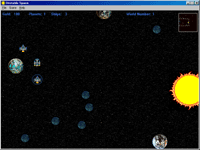 This division is not strict and concerns only those races that are supplied with the game. Using the race editor you can
design ships not meeting these parameters. Some extra features are to be mentioned: Except getting money from resource trade every planet gives you $100 every turn (without the Global Banking System). When attacking an enemy planet you have a choice either to destroy or capture it. You can destroy a planet by using the Destructive Nuclear Missile (immediate annihilation) or firing with conventional weapons lower its Shield Points down to zero. If the Shield Points get between 100 and 0 the planet is captured. All enemy ships present on the planet will be captured too. Recommendations: Develop your civilization, build ships, gather resources, capture the planets and destroy enemies. Worship the Lords and let victory be with you! Game interface is rather simple and is similar to that of many other strategic games. At the top left corner there are displayed: Gold - amount of money that you can spend, Planets - quantity of your planets, Ships - quantity of your spaceships. At the top right corner there is the world map, on which there are located: a star (big yellow dot), planets (uninhabited are white, inhabited colored in the color of the race), asteroids (small white dots), ships (small dots colored in the race color). The dotted frame locates the screen position. The rest of the screen is occupied by the game field itself. The game control uses two mouse buttons and the hot keys that correspond to commands in the menu. PgUp and PgDn keys correspond to the commands Next World and Prev World and are used to switch between the parallel worlds. The End key corresponds to the command End Turn in the Game menu, and starts the computer players' turn. Use F5 key to switch between your ships, F6 key to switch backward. Use F7 key to center the active object on the screen. To scroll you need to move the mouse to the edge of the screen or use the cursor control keys. A single mouse click on an object selects it and puts it into a circle colored in the color of your race. Double clicking an object shows the object dialog. Right-clicking cancels the selection. 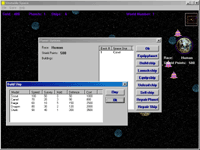 To start a new game you should choose New from the File menu. You will see the
new game dialog parameters of which will be described here. Worlds Quantity - specifies the number of parallel worlds:
Few - from 2 to 4, Several - from 5 to 7, Lots - from 8 to 10. World Size - specifies the world size: Huge - 3000x3000 points,
Large - 2500x2500 points, Medium - 2000x2000, Small - 1500x1500, Tiny - 1000x1000 points. Resources - specifies the
quantity of asteroids with resources: Lots - 7 asteroids per planet, Several - 5 per planet, Few - 3 asteroids per planet.
Unstability - specifies the unstability rate: High - high probability for an object to get into an unstable area, Medium -
average probability for an object to get into an unstable area, Low - little probability for an object to get into an unstable
area, None - no unstable areas. AI Players - specifies the number of computer-controlled players: Few, Several, Lots. The
number depends on the specified Worlds Quantity parameter and varies from 2 to 20. Credits - seed amount of cash. Race
Type - choose your race: Human, Borgs, Impires or Cyborgs. If new race description files are added this list will be
enlarged. Let's take a look at the planet dialog. On the left you can see the race owning the planet, defense shield status, equipment built. In the middle there is a list of landed ships. On the right there are buttons: Equip Planet - building and selling planet facilities; Build Ship - building a ship from the list of ships available for this race; Start Ship - launching the ship into the space; Equip Ship - buying and selling ship equipment; Unload Ship - unload the selected ship and sell the resources; Sell Ship - selling the selected ship; OK - leaving the dialog. Let's take a look at the asteroid dialog. At the top left corner resource amount is displayed. Below is the list of landed ships. On the right there are buttons: Start Ship - launches the ship, Load Ship - loads the holds, OK - leaving the dialog. The ship dialog. Ship information is displayed: Ship Type, Action Points - the distance that the ship can cover during this turn, Shield Points - defense status, View Points - radar ability, Holds - number of holds (full or empty), Equipment - equipment installed on the ship. On the right there are buttons: Hyperjump - using the Hyperjumper device, you are to switch to any parallel world and left-click the mouse - the ship will move to this point, Launch Missile - launching the Destructive Nuclear Missile, you are to aim at a ship, planet or asteroid and farewell, OK - leaving the dialog. Controlling the ship. To simplify the control two circles are displayed on the screen: the white one shows maximum distance to cover during the turn (it depends upon the Action Points), the red one shows maximum firing distance if the ship carries weapons. Changing cursors also help to control, when the cursor is 'Move' - the ship can travel there, 'Land' - the ship can land there, 'Jump' - the ship can jump there. To jump the ship must be equipped with a Jumper device. You are to point at any point in the world and the ship will jump there. The concept of unstability was included into the game to increase the random factor. Its rate can be specified in the start game dialog. It can be defined as follows: at a random turn at a random point of a world a circle of random radius is rendered. All objects within this circle are relocated into a random parallel world. For example, imagine that you are developing, gathering resources and improving your planet but suddenly you notice that the neighbor race has built an armada of ships and is going for the kill. You have got almost nothing to fight with. In another game you can restart the mission but not here. Approaching the planet the foe's army has got into a space shift and disappeared in an indefinite world. This is the real case that happened with the author. As for the authors' personal point of view unstability adds more interest and excitement. But you can disable it in the new game dialog and you'll get a common turn-based strategy. |
|
Copyright © 2001 Mirage Software Contact points are: Internet: http://members.fortunecity.com/miragesoft E-Mail: [email protected] Tel: +7(8142)710538 Postal Mail: 185009, Russia, Karelia, Petrozavodsk, Drujba street, 17, 12. |
Last updating:
15 / 12 / 2001
|